
QR Code Seating Charts
That Work on Any Phone
Print one QR code. Guests scan it on arrival, type their name, and see their table — no app download, no foam board, no escort card scramble. The seating chart QR code that works on every iPhone and Android.
See What Guests Experience
A real Digiseats seating chart in action — scan, search, seated.
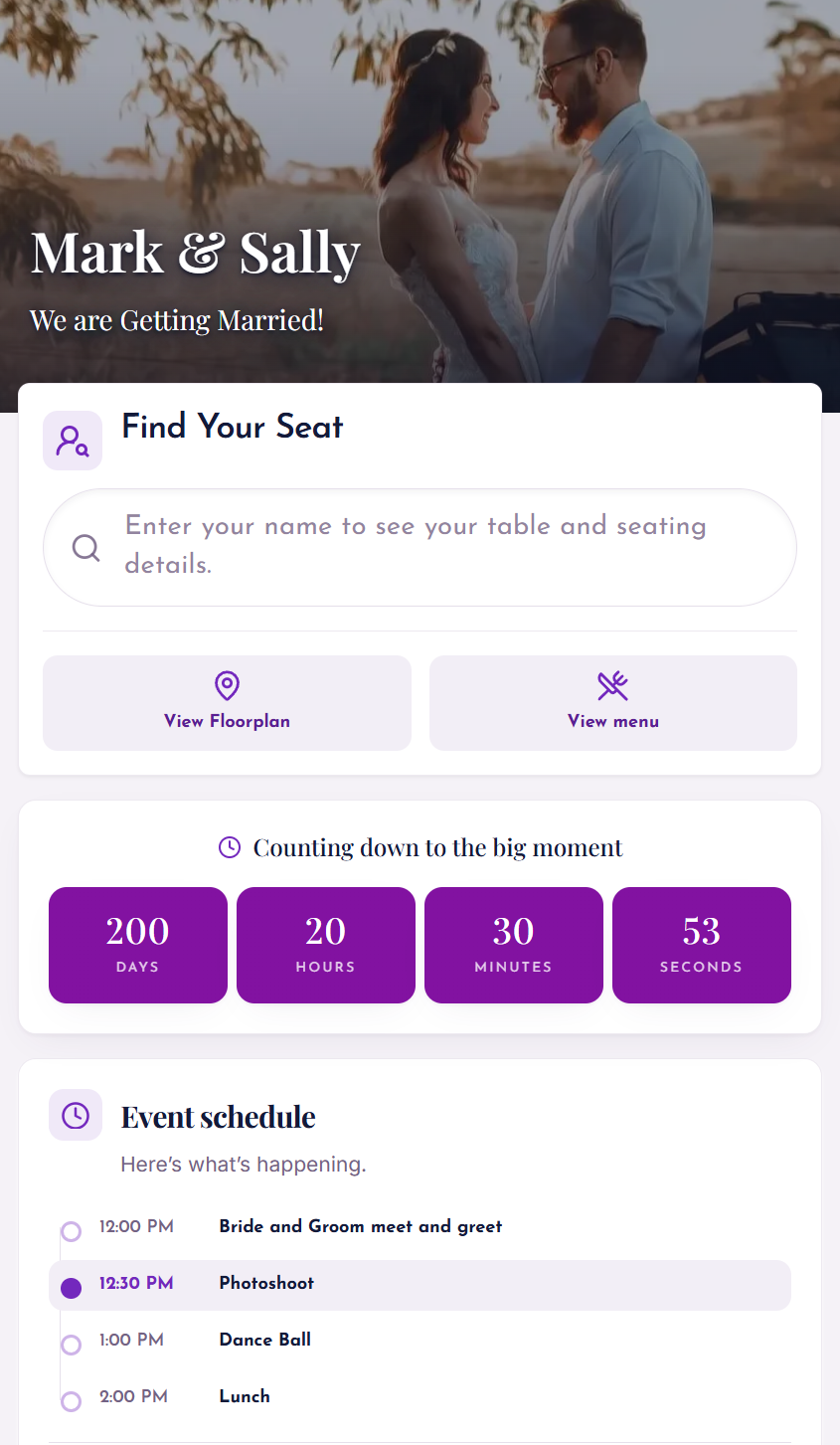
Try the Live Demo
I still have a photo on my phone of the exact moment I decided I was done with traditional seating charts forever. It was 11 PM on a Friday night, less than 24 hours before a wedding for a client I will call Sarah. Sarah was a lovely bride, but her guest list was chaos. We had just paid $250 to rush-print a massive A1 foam board seating chart. It looked beautiful. It was perfect.
Then my phone buzzed.
It was Sarah. Her cousin, let's call him Kevin, had just broken up with his girlfriend. He was still coming, but he absolutely could not sit at Table 5 anymore. He needed to be moved to Table 12, as far away from his ex as possible. But Table 12 was full. This meant I had to move Aunt Linda to Table 3. And just like that, my $250 printed board was garbage.
I spent that night with a sharpie and a bottle of white-out, ruining the aesthetic of a luxury wedding just to accommodate one breakup.
I promised myself: never again. That was when I discovered the life-saving technology of the QR code seating chart.
What is a QR Code Seating Chart?
At its core, a QR code seating chart is a digital landing page that hosts your floor plan. Instead of printing a list of 200 names on a physical board, you print a single QR code. This code can be placed on a small easel, on cocktail napkins, or even texted to guests before they arrive.
When a guest scans the code with their smartphone camera, they are taken to a searchable, mobile-friendly website. They type in their name, and the system tells them exactly where to go.
"Welcome, Michael. You are seated at Table 4."
It sounds simple, but the implications for your sanity are massive. It changes the seating chart from a static, fragile poster into a living, breathing database that you can update until the very last second. Learn more about how guests find their seat using a QR code at real events.
The Problem with the "Old Way"
To understand why Digiseats is such a game-changer, we have to be honest about how bad the traditional method actually is.
Last-Minute Changes
Guest lists are fluid. People get sick. Babysitters cancel. Plus-ones break up. With a printed chart, any change after your print deadline is a disaster. You are left choosing between a wrong chart or a messy, hand-corrected one.
Crowding at the Entrance
Picture 150 people arriving at the same time. If you have one physical seating chart, you have 150 people crowding around one easel. They are squinting. They are pointing. They are blocking the hallway.
Time & Money Wasted
Designing a physical chart takes time. Then you pay for printing. Then shipping. If you find a typo — like spelling 'Jon' as 'John' — you pay for it all over again.
Feature Deep Dive: Why Digiseats Works in the Real World
Real examples of how specific features saved me from awkward situations.
1. The Search Bar (No More Squinting)
Corporate Gala — 400 Guests
At a corporate gala last winter, I had a guest list of 400 people. A printed list for 400 people is huge. The font has to be tiny to fit everything.
With Digiseats, I placed five small frames with the QR code around the cocktail area. Guests scanned the code while grabbing a drink. They typed in their name. Boom. "Table 32."
There was no crowding. No bottleneck. One older gentleman told me he loved it because he didn't have to put on his reading glasses to find his name on a wall. He just looked at his own phone screen.
2. Real-Time Updates (The "Secret" Weapon)
Jessica's Wedding — 2 Hours Before
Two hours before the reception, a guest named Mark texted to say his flight was cancelled. He wasn't coming. Mark was seated at a table of 8. With him gone, Table 7 would have an awkward empty chair.
I didn't panic. I opened Digiseats on my phone. I saw that we had a "floater" guest at Table 9 who didn't really know anyone there. I dragged and dropped that guest into Mark's empty seat at Table 7.
When that guest scanned the QR code an hour later, it simply said "Table 7." They never knew they had been moved. The chart was 100% accurate at the moment of the scan.
3. Privacy and the "Anonymous" View
VIP Dinner — Security Concern
On a physical chart, everyone sees everyone else's name. I organized a dinner where a local politician was attending. He didn't want his name on a public board for security reasons.
With Digiseats, I enabled the privacy setting. When guests scanned the code, they could only search for their own name. They couldn't scroll through a list to see who else was there. It added a layer of security and discretion that a physical board makes impossible.
4. The "Table Finder" Feature
Large Venue — 50 Tables
It is one thing to know you are at Table 9. It is another thing to find Table 9 in a dark, crowded ballroom.
Digiseats includes a feature that helps visualize the room. It acts like a map. I watched a guest scan her code, get her table number, and then look at the digital map on her screen to see that Table 9 was near the dance floor. She walked straight there. No wandering around the room looking lost.
How to Set Up Your First Digiseats Chart
The transition from physical to digital is actually easier than formatting a print file.
Upload Guest List
Upload your Excel or CSV file. The system reads columns for First Name, Last Name, and Table Number.
Customize the Look
Upload engagement photos or company logos as backgrounds. Change the welcome message to match your event.
Generate the Code
The system gives you a unique QR code. Download it as a high-resolution image.
Distribute Creatively
Print it on menu cards, project it on a wall, frame it on an easel, or text it to guests beforehand.
Manage Live
Keep the dashboard open on your tablet. Make instant changes on event day — the QR code stays the same.
The Sustainability Argument
A large foam core seating chart is used for exactly four hours. After dinner, it goes into a dumpster. It is non-recyclable plastic and paper.
By switching to a digital seating chart, you eliminate this waste entirely. One client — a tech company focused on green energy — calculated that for their 500-person conference, they saved roughly 30 large sheets of poster paper and foam core over the weekend.
It is a small step, but it matters.
Addressing the "Technophobic" Guest
"What about Grandma? She doesn't know how to scan a QR code."
This is a valid concern, but rarely an actual problem. Here is why:
Cost Comparison: Digital vs. Physical
Traditional Method
Digiseats Method
Plus the priceless benefit of zero panic attacks.
Why Digiseats Specifically?
No App Required
Guests scan, it opens in Safari or Chrome, and they are done. No downloads.
Speed & Reliability
The site loads fast. When 200 people hit a website at the same time on venue Wi-Fi, you need lightweight code. Digiseats doesn't crash.
Flexible Tiers
Standard for small bridal showers. Extended for massive charity balls with 1,000 guests. You are never overpaying for small events.
Final Thoughts: The New Standard
The era of the sticky note and the crossed-out name is over. Our lives are too dynamic, and our events are too complex to rely on static paper documents.
Using a QR code seating chart is not just about being "trendy." It is about acknowledging the reality of hosting humans. Humans are unpredictable. We change our minds. We run late. We have preferences.
Digiseats allows you to be a gracious host by rolling with these punches. Instead of greeting your guests with a scratched-out, corrected, messy board, you greet them with a sleek, digital interface that works perfectly every time.
Skip the print shop. Upload your list. Generate the code. And when that inevitable "Kevin" calls you with a last-minute change, just smile, click "drag and drop," and enjoy your evening.
How the QR Code Seating Chart Works
One QR code, generated once, that handles 20 guests or 2,000 — and updates in real time without ever needing to be re-printed.
Generated from your guest list
Upload an Excel or CSV with names and table numbers. DigiSeats creates a unique URL for your event and converts it into a single high-resolution QR code you can download.
Scans open in the phone's browser
Guests point their camera at the QR code. The seating chart opens instantly in Safari or Chrome — no app, no install, no account.
Guests search their own name
A search bar replaces the giant printed board. Guests type the first few letters of their name and see their table assignment in under a second.
Scales from 20 to 2,000+ guests
Because each guest only loads their own result, the experience stays fast even with a 1,000-person gala hitting the URL at the same time on venue Wi-Fi.
Updates without re-printing
The QR code points to a live URL. Move a guest at 4pm and the 5pm scan shows the new table. The printed QR code never has to change.
Works on every modern phone
Compatible with iOS and Android. No special hardware, no kiosk, no staff training — guests already know how to scan.
What Makes DigiSeats QR Codes Different
Most "QR code seating chart" tools are repurposed link shorteners. DigiSeats is built for one job: getting hundreds of guests to their tables without friction.
Zero app downloads
The scan opens directly in the browser. No App Store detour, no permissions prompts, no signup wall.
Instant first paint
The page is lightweight by design, so it loads in under a second on venue Wi-Fi or weak LTE.
Scannable from anywhere
Print the QR code on entrance signage, the back of menus, programs, escort cards, or even cocktail napkins — guests can self-serve from any of them.
Private 'find me only' mode
Optional privacy setting hides the full guest list. Each guest can only look up their own name — ideal for VIP, corporate, and security-sensitive events.
Live updates without reprinting
Move a guest, swap a table, or add a late RSVP from your phone. The QR code itself never changes.
One code for the whole event
No per-guest codes to track. One QR works for every guest, every table, every plus-one — and you can reprint it at any size.
QR Code Seating Chart Ideas for Weddings
A QR code wedding seating chart can replace your escort cards, your foam board, or both — and looks intentional rather than improvised.
Framed sign at the entrance
A single 8x10 or 11x14 frame with the QR code, a short instruction line ('Scan to find your seat'), and your monogram. Replaces a $250 foam board with a $20 frame.
Escort card replacement
Print mini QR cards instead of individual escort cards. Guests grab one on the way in and scan — no calligraphy, no last-minute reprints.
Wedding program insert
Embed the QR code on the program or menu. Guests at the table can re-scan to confirm seating or look up other guests they want to find at cocktail hour.
Welcome bag insert
Drop the QR card into welcome bags at the hotel so out-of-town guests know their table before they even arrive at the venue.
Save-the-date or RSVP follow-up
Text the same QR or link in the week-of email. Guests preview their table on the drive over.
Backup at the host stand
Keep an iPad on the same dashboard at the check-in table for the rare guest without a phone — same data, no separate list to maintain.
QR Code Seating for Corporate Events & Galas
For 300-, 500-, and 1,000-guest events, a printed board is a bottleneck. A QR code seating chart turns check-in into a self-serve flow.
Large guest counts without crowding
Place 5–10 small frames with the same QR code around cocktail hour. Instead of one mob at one easel, 500 guests look up their table in parallel — on their own screens.
Real-time updates for late RSVPs
Sponsors confirm at the last minute, executives swap tables, dietary changes shift seats. Update the chart from your phone and every future scan reflects the new assignment instantly.
Assign by company, team, or department
Group guests by organization or role. The same QR code routes a VP to the sponsor table and an engineer to the team table — no separate signage required.
Privacy mode for sensitive attendees
Politicians, donors, and executives often don't want their name on a public wall. Enable 'find me only' so each guest can only look up their own seat.
Branded for the event
Drop in the event logo, sponsor colors, and a welcome message. The page guests scan into looks like part of the event, not a third-party tool.
How to Print Your QR Code Seating Chart
DigiSeats exports a high-resolution PNG so you can print the QR code at any size — from 1-inch escort cards to 24-inch venue signage.
Entrance signage (11x14 or larger)
Minimum QR code size of 4 inches square so it scans easily from arm's length. Pair with a one-line instruction: 'Scan to find your seat.'
Menus, programs, table cards (1–2 inches)
1.5 inch is the safe minimum on printed paper. Keep at least 1/4 inch of white space around the code so cameras can detect the edges.
Escort cards & welcome bags
Print on heavyweight cardstock so guests don't bend the code in their pocket. Add the guest's first name above the QR if you want a personal touch.
Print shop tips
Export at 300 DPI (DigiSeats does this by default). Test-scan a draft print from 6 feet before placing the final order — venue lighting can affect contrast.
What if a guest doesn't have a smartphone? Keep a single iPad or laptop at the check-in table with the DigiSeats dashboard open. Staff can look up any guest in seconds using the same backend — no separate printed list to keep in sync.
Frequently Asked Questions
Do guests need to download an app to use a QR code seating chart?
No. DigiSeats opens in the phone's default browser (Safari or Chrome) the moment a guest scans the QR code. There is no app download, no account creation, and no login.
What if someone does not have a smartphone?
Keep a single iPad or laptop at the check-in table running the same DigiSeats dashboard. A staff member or family member can look up any guest's table in seconds. Smartphone adoption is also nearly universal, so this rarely comes up.
Can I update the seating chart after I print the QR code?
Yes. The QR code points to a live URL, so the code itself never changes. Update guest names, table assignments, or the entire layout from your phone and every future scan shows the latest version instantly.
How many guests can a QR code seating chart handle?
DigiSeats handles everything from 20-person dinners to 1,000+ guest galas. The Standard plan is sized for typical weddings, and the Extended plan is built for large corporate events and conferences.
Is the QR code seating chart free?
Yes — there is a free plan to generate and test a QR code seating chart. Paid plans unlock larger guest counts, custom branding, privacy mode, and live updates on event day.
Can I make last-minute seating changes with a QR code chart?
Yes. Changes update in real time. The QR code stays the same — only the data behind it changes. Guests always see the latest seating when they scan.
Or read about the digital seating chart on our homepage and the full digital seating chart guide.
Explore More About Digital Seating
Digital Seating Chart
Why modern events are going paperless with digital seating solutions.
Read moreFind Your Seat with QR Code
Why more events are ditching the printed board for instant QR code lookup.
Read moreWedding QR Code for Photos
Let guests upload and share photos through the same QR code system.
Read more