
Wedding Seating Chart — The QR Code Version Your Guests Will Actually Use
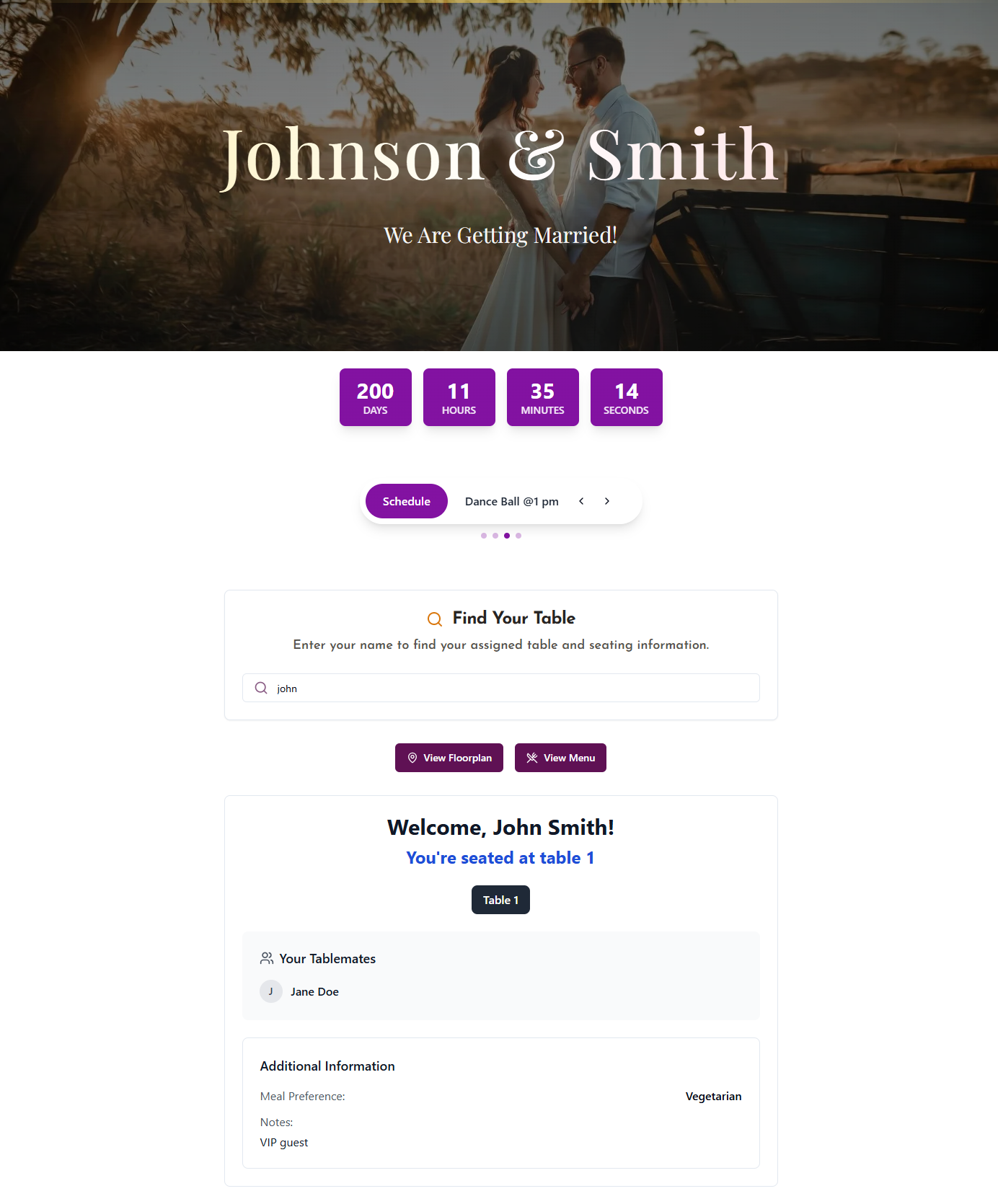
Skip the crowded printed board. With DigiSeats, your guests scan one QR code, type their name, and see their table in under 3 seconds — on any phone, with no app to download. Update the list any time, even on the wedding day.
What Is a Wedding Seating Chart?
A wedding seating chart tells each guest which table they are assigned to at the reception. It is displayed near the venue entrance so guests can find their seat before dinner begins — and it is one of the few details that affects almost every guest at your wedding.
The Traditional Approach (and Its Problems)
The classic approach is a printed seating board or an escort card display at the entrance. For a 200-guest wedding, that means one sign, one door, and roughly 30 seconds of reading time per guest — multiplied by everyone arriving in the same 20-minute window. The result is predictable: crowding, awkward small talk in a hallway, and a stressed venue coordinator trying to clear the bottleneck before dinner service falls behind.
The Smarter Alternative
A digital wedding seating chart doesn't replace the idea of telling guests where to sit — it replaces the physical format. With DigiSeats, guests scan one QR code and search their name from anywhere in the venue. No crowding, no reprinting when your guest list changes, and no expensive foam board to throw out the next morning. See how DigiSeats works →
How a QR Code Wedding Seating Chart Works
- 1
Upload your guest list (CSV, Excel, or manual entry) to the DigiSeats dashboard.
- 2
Assign each guest to a table. Update any time before or even during the event.
- 3
DigiSeats generates your QR code. Print it on a sign, card, or display — or have DigiSeats print it for you.
- 4
Guests scan the QR code at the entrance with their phone camera. No app download required.
- 5
A search bar appears. Guests type their name and see their table number in under 3 seconds.
Real-time edits mean no reprinting — and guests never have to touch a printed board or wait in a line.
Digital Wedding Seating Chart vs. Traditional Printed Board
The same job, two very different guest experiences. Here is what couples actually compare when choosing between a printed seating chart and a digital one.
| Factor | Printed Seating Chart | DigiSeats (QR Code) |
|---|---|---|
| How guests find their seat | Crowd around one board at entrance | Scan QR code on their phone anywhere in venue |
| Last-minute changes | Reprint required — $80 to $250+ cost | Update the dashboard, changes appear instantly |
| Guest experience | Wait in line, hard to read, crowding | Search name, see table in under 3 seconds |
| App required? | No | No — opens in phone browser automatically |
| Vendor meal tracking | Separate spreadsheet or paper list | Dietary info visible in dashboard |
| Privacy for VIP guests | All names visible to everyone | Anonymous View hides profile from public list |
| Event information | Seating only | Menu, schedule, floorplan, countdown (Extended) |
| Cost for 200 guests | $80 to $200 for printing alone | $49.99 one-time, no reprint ever needed |
| Environmental impact | Foam board, paper, ink waste | Zero physical waste |
| Backup if things go wrong | No easy backup — chart is the only copy | Access from any device, update in real time |
The biggest wins: real-time updates with no reprinting, zero crowding at the entrance, and an event hub that goes well beyond seating. Read our full comparison →
What's Included in a DigiSeats Wedding Seating Chart
Guest Name Search
Guests type their name and see their table in under 3 seconds. Works on any smartphone — no app required.
Real-Time Seating Updates
Update your guest list and table assignments any time before or during the event. Changes appear instantly when guests scan — no reprints, no crossed-out names.
QR Code Sign Included
Every package includes a print-ready QR code sign. Place it at the venue entrance, cocktail tables, or on welcome cards.
Guest Privacy — Anonymous View
High-profile or private guests can be protected with Anonymous View, which limits full list visibility without removing their seating information.
Event Hub (Extended)
Upgrade to Extended for a complete digital event hub: floorplan upload, menu display, countdown timer, event schedule, and guest photo sharing.
Check-In Tracking (Extended)
Monitor which guests have arrived in real time from your phone or any device with a browser.
Wedding Seating Chart Pricing
Transparent, one-time pricing — choose the plan that fits your guest count. All packages include unlimited real-time updates.
Free
Up to 50 guests. Basic guest name search and QR code. Ideal for small intimate weddings or bridal showers.
Get Started FreeStandard
Up to 500 guests. Full QR code sign, real-time updates, guest search, CSV import. Perfect for the average wedding.
Order StandardExtended
Up to 1,000+ guests. Everything in Standard plus floorplan, menu, schedule, check-in tracking, and photo sharing. Ideal for large weddings and events.
Order ExtendedAll packages include unlimited real-time list updates at no additional cost. One-time payment, no subscription.
How to Make a Wedding Seating Chart
Six steps that actually work, from couples and planners who've done it hundreds of times.
- 1
Wait for 90% of RSVPs.
Starting too early wastes effort when the list keeps changing. Aim for 4–6 weeks before the wedding.
- 2
Identify your VIPs and constraints first.
Parents, grandparents (near exits, away from speakers), divorced relatives (separate tables with a visible buffer), guests with dietary needs.
- 3
Choose your table format.
Round tables encourage conversation across the group; rectangular tables fit more guests in tighter venues. Decide between a head table or a sweetheart table for the couple.
- 4
Group by relationship, not just acquaintance.
College friends, work colleagues, family from each side, and mixed tables for singles tend to work better than purely alphabetical seating.
- 5
Upload to DigiSeats and assign tables.
Import via CSV or Excel and drag guests onto tables. Real-time adjustments are possible up to and during the event.
- 6
Place your QR code signs.
Entrance, cocktail table, bar area — multiple scan points spread guest flow and eliminate the bottleneck at a single board.
The hardest part of a wedding seating chart is the people dynamics, not the tool. DigiSeats handles the technology so you can focus on the relationships.
Real Couples, Real Weddings
"We had 180 guests and not a single one stood at the entrance confused. The QR code on the welcome sign just worked. Best $50 we spent on the wedding."
Sarah & James
Wedding • 180 guests
"Our florist cancelled three tables of arrangements two days before the wedding. We re-shuffled the seating in DigiSeats in 10 minutes. No reprinting, no panic."
Priya & Daniel
Wedding • 220 guests
"I'm a wedding planner — I now recommend DigiSeats to every couple. The check-in tracking on Extended is a game-changer for vendor meals."
Megan R.
Wedding Planner
Trusted by hundreds of couples and event planners. Rated 4.9/5.
Frequently Asked Questions
Ready to Replace Your Printed Board?
Build your wedding seating chart in five minutes. Update it any time. Let your guests find their seat in seconds — not in a line.